Saturday, April 14, 2018

Issue while Installing Adxstudio Portal 7.0.0026 in Dynamics 365


When you are going to install  Adxstudio Portal 7.0.0026 in Dynamics 365, you may get the following error. It means that you are not allowed to update the Marketing List canmodifymobileclientreadonly attribute due to it is being restricted in AdxstudioPortalDependencies Solution.


Error :
[entity] List - The evaluation of the current component(name=Entity, id=efd3a52d-04ca-4d36-a54c-2a26a64f5571) in the current operation (Update) failed during managed property evaluation of condition: The evaluation of the current component(name=Entity, id=efd3a52d-04ca-4d36-a54c-2a26a64f5571) in the current operation (Update) failed during managed property evaluation of condition: Managed Property Name: canmodifymobileclientreadonly; Component Name: Entity; Attribute Name: canmodifymobileclientreadonly;

Solution :
  1. Go to Adxstudio Portal Installed Location. Let say: I have installed it in C:\Program Files (x86).
  2. Navigate to C:\Program Files (x86)\Adxstudio\XrmPortals\7.0.0026\Customizations\Components.
  3. Extract the AdxstudioPortalsDependencies.zip solution to some other location.
  4. Now open the Customization.xml file.
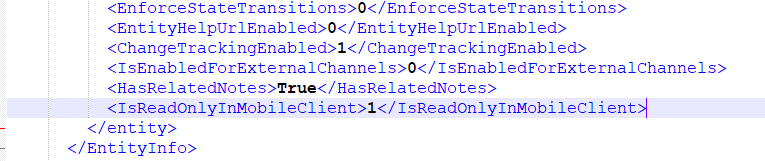
  5. Modified following values from 0 to 1 under Marketing List Entity.
    <IsVisibleInMobile>1</IsVisibleInMobile>
    <IsVisibleInMobileClient>1</IsVisibleInMobileClient>
    <IsReadOnlyInMobileClient>1</IsReadOnlyInMobileClient>

  6. Select all the folder and Zip it again to create the updated AdxstudioPortalsDependencies solution.
  7. Import the solution in Dynamics 365.
Now you can install the Portal (Basic, Community, Customer etc).


Monday, April 9, 2018

Level up for Dynamics CRM/365

I found a very useful Chrome extension :  Level up for Dynamics CRM

There are so many useful features which saves developers time.
You can visit following URL and see all the available featurs.

https://github.com/rajyraman/Levelup-for-Dynamics-CRM/blob/master/README.md

When you open a CRM, the extension enables for you and when you click it will show following options. Those options are described in the given link before.


If you have open a record form, it'll show additional options as below.


Thursday, April 5, 2018

Dynamics 365 Share and Un-Share Records Programmatically C#

Please refer to these codes, to Share Records, and Unshare Records.
/// <summary>
/// Shares the record.
/// </summary>
/// <param name="service">The service.</param>
/// <param name="tracingService">The tracing service.</param>
/// <param name="targetEntity">The target entity.</param>
/// <param name="targetUser">The target user.</param>
private void ShareRecord(IOrganizationService service, ITracingService tracingService, EntityReference targetEntity, EntityReference targetUser)
{
    //no delete access
    GrantAccessRequest grant = new GrantAccessRequest();
    grant.Target = targetEntity;

    PrincipalAccess principal = new PrincipalAccess();
    principal.Principal = targetUser;
    principal.AccessMask = AccessRights.ReadAccess | AccessRights.AppendAccess | AccessRights.WriteAccess | AccessRights.AppendToAccess | AccessRights.ShareAccess | AccessRights.AssignAccess;
    grant.PrincipalAccess = principal;

    try
    {
        service.Execute(grant);
    }
    catch (Exception ex)
    {
        tracingService.Trace("Exception: {0}", ex.ToString());
        throw ex;
    }
}

/// <summary>
/// Un shares the record.
/// </summary>
/// <param name="service">The service.</param>
/// <param name="tracingService">The tracing service.</param>
/// <param name="targetEntity">The target entity.</param>
/// <param name="targetUser">The target user.</param>
private void UnShareRecord(IOrganizationService service, ITracingService tracingService, EntityReference targetEntity, EntityReference targetUser)
{
    //no delete access
    ModifyAccessRequest modif = new ModifyAccessRequest(); ;
    modif.Target = targetEntity;

    PrincipalAccess principal = new PrincipalAccess();
    principal.Principal = targetUser;
    principal.AccessMask = AccessRights.None;
    modif.PrincipalAccess = principal;

    try
    {
        service.Execute(modif); ;
    }
    catch (Exception ex)
    {
        tracingService.Trace("Exception: {0}", ex.ToString());
        throw ex;
    }
}

Wednesday, April 4, 2018

Errors importing marketing list entity in Dynamics 365 v9

When you try to move your customization in  marketing list entity in Dynamics 365 v9, you may receive an error importing the customization.

By default "Read-only in mobile" is selected. Since "Enable for mobile" is not selected, "Read-only in mobileis not included in the exported solutions customization XML.

You can fix this issue by following  below steps. 
  1. Extract the solution and open the customization XML file
  2. Locate the List entity in the XML file
  3. Add the following tag in the XML file:<IsReadOnlyInMobileClient>1</IsReadOnlyInMobileClient>
  4. Zip the solution and import it again

Monday, February 27, 2017

Deleting Calendar Rules in Microsoft Dynamics CRM 2016

/// <summary>
/// Clears the calender rules.
/// </summary>
/// <param name="service">The service.</param>
/// <param name="bookableResourceId">The bookable resource identifier.</param>
/// <param name="startDate">The start date.</param>
/// <param name="endDate">The end date.</param>
public static void ClearCalenderRules(IOrganizationService service, Guid bookableResourceId, DateTime startDate, DateTime endDate)
{
    using (var context = new CrmServiceContext(service))
    {
        var bookableResource = context.BookableResourceSet.Where(b => b.Id == bookableResourceId).FirstOrDefault();

        if (bookableResource?.CalendarId != null)
        {

            Entity entity = service.Retrieve("calendar", bookableResource.CalendarId.Id, new ColumnSet(true));
            EntityCollection entityCollection = (EntityCollection)entity.Attributes["calendarrules"];

            int num = 0;
            List<int> list = new List<int>();
            foreach (Entity current in entityCollection.Entities)
            {
                DateTime dateTime2 = Convert.ToDateTime(current["starttime"]);
                if (dateTime2 >= startDate && dateTime2 <= endDate)
                {
                    list.Add(num);
                }

                num++;
            }

            list.Sort();
            list.Reverse();

            for (int i = 0; i < list.Count; i++)
            {
                entityCollection.Entities.Remove(entityCollection.Entities[list[i]]);
            }

            entity.Attributes["calendarrules"] = entityCollection;
            service.Update(entity);
        }
    }
} 

How to remove all NewLines from a variable in SQL Server

Declare @A NVarChar(500);

Set @A = N' 12345
        25487
        154814 ';

Set @A = Replace(@A,CHAR(13)+CHAR(10),' ');

Print @A;

Creating Calendar Rules in Microsoft Dynamics CRM 2016

/// <summary>
/// Creates the calender.
/// </summary>
/// <param name="service">The service.</param>
/// <param name="bookableResourceId">The bookable resource identifier.</param>
/// <param name="startTime">The start time.</param>
/// <param name="durationInMinutes">The duration in minutes.</param>
private static void CreateCalender(IOrganizationService service, Guid bookableResourceId, DateTime startTime, int durationInMinutes)
{
    using (var context = new CrmServiceContext(service))
    {
        var bookableResource = context.BookableResourceSet.Where(b => b.Id == bookableResourceId).FirstOrDefault();

        // Get the user calendar
        var calendar = context.CalendarSet.First(r => r.Id == bookableResource.CalendarId.Id);

        // Retrieve the calendar of the user
        Entity userCalendarEntity = service.Retrieve("calendar", calendar.Id, new ColumnSet(true));

        // Retrieve the calendar rules defined in the calendar
        EntityCollection calendarRules = (EntityCollection)userCalendarEntity.Attributes["calendarrules"];

        // Create a new inner calendar
        Entity newInnerCalendar = new Entity("calendar");
        newInnerCalendar.Attributes["businessunitid"] = new EntityReference("businessunit", ((Microsoft.Xrm.Sdk.EntityReference)(userCalendarEntity["businessunitid"])).Id);
        Guid innerCalendarId = service.Create(newInnerCalendar);

        // Create a new calendar rule and assign the inner calendar id to it
        Entity calendarRule = new Entity("calendarrule");
        //calendarRule.Attributes["duration"] = durationInMinutes;
        calendarRule.Attributes["duration"] = 1440; // 24hrs in minutes
        //It specifies the extent of the Calendar rule,generally an Integer value.
        calendarRule.Attributes["effort"] = 1.0;

        calendarRule.Attributes["extentcode"] = 1;
        calendarRule.Attributes["pattern"] = "FREQ=DAILY;COUNT=1";
        //Rank is an Integer value which specifies the Rank value of the Calendar rule
        calendarRule.Attributes["rank"] = 0;
        // Timezone code to be set which the calendar rule will follow
        calendarRule.Attributes["timezonecode"] = bookableResource.TimeZone;
        //Specifying the InnerCalendar Id
        calendarRule.Attributes["innercalendarid"] = new EntityReference("calendar", innerCalendarId);

        //Start time for the created Calendar rule
        calendarRule.Attributes["starttime"] = startTime.Date;

        calendarRules.Entities.Add(calendarRule);

        // assign all the calendar rule back to the user calendar
        userCalendarEntity.Attributes["calendarrules"] = calendarRules;
        // update the user calendar entity that has the new rule
        service.Update(userCalendarEntity);

        // Calendar rule for Working Day 
        Entity workingHourcalendarRule = new Entity("calendarrule");
        workingHourcalendarRule.Attributes["duration"] = durationInMinutes;
        //Effort available for a resource (User) during the time described by the calendar rule i.e. Capacity part in the Calendar rule
        workingHourcalendarRule.Attributes["effort"] = 1.0;
        // It is a Flag used in vary-by-day calendar rules.
        workingHourcalendarRule.Attributes["issimple"] = true;

        workingHourcalendarRule.Attributes["offset"] = startTime.Hour * 60 + startTime.Minute; //to indicate start time
        //Rank of the Calendar Rule
        workingHourcalendarRule.Attributes["rank"] = 0;
        //Sub Type of the Calendar rule.For setting Work hours it is 1.
        workingHourcalendarRule.Attributes["subcode"] = 1;
        //Type of calendar rule such as working hours, break, holiday, or time off. 0 for working hours
        workingHourcalendarRule.Attributes["timecode"] = 0;
        // Local time zone for the calendar rule.
        workingHourcalendarRule.Attributes["timezonecode"] = -1;
        //Specifying the InnerCalendar Id
        workingHourcalendarRule.Attributes["calendarid"] = new EntityReference("calendar", innerCalendarId);

        EntityCollection innerCalendarRules = new EntityCollection();
        innerCalendarRules.EntityName = "calendarrule";
        innerCalendarRules.Entities.Add(workingHourcalendarRule);

        newInnerCalendar.Attributes["calendarrules"] = innerCalendarRules;
        newInnerCalendar.Attributes["calendarid"] = innerCalendarId;
        service.Update(newInnerCalendar);
    }
}